Skip to content
Running in production for our own alerts

SMS & voice call alert API router

Add SMS and phone-call alerts to software you can’t change.

Alerts Router is a ready-made alert and notification router that your existing software calls over HTTP. It sends the SMS, places the voice call, dials again until someone answers, skips duplicates and logs everything. It is not a developer platform, an auto-dialler or a bulk-SMS panel. SMS and calls go out through your own SMS and voice-call provider accounts.

  • One HTTP call from any software
  • SMS, phone call, or both
  • Unanswered calls are dialled again, failed SMS retried
  • Duplicate alerts are stopped before they flood a phone
  • Every alert logged, and Insights shows what wastes credit
An API call and the router’s reply — illustrative mockup, sample data
  • 10 million+ alerts routed across our current and previous servers
  • We run our own vehicle tracking alerts through it
  • Runs on your own SMS and voice-call provider accounts
  • Built and maintained by E-Tracking Solutions, serving tracking customers since 2017

Your software can’t text or call. The router can.

Six gaps almost every alert setup has — and how the router closes them.

Software that can only show alerts on screen

Your ERP, monitoring or CCTV system raises an alert, but nobody is looking at the screen.

With the router: it makes one HTTP call, and the SMS and the phone call go out.

An SMS nobody reads

The alert that matters most is the one that gets ignored.

With the router: the same alert can also ring a phone with a recorded voice message, chosen by a tag.

A call that rings out

One missed call and the alert is forgotten.

With the router: the call is checked against the gateway’s report and dialled again until it is answered or the retry window ends.

Failed SMS that vanish

The gateway rejects a message and nobody ever knows.

With the router: a rejected SMS is sent again later, and every attempt is on the record.

The same alert, again and again

A flapping sensor or a looping script can fill a phone and empty your credit in an afternoon.

With the router: repeats of the same message to the same number are skipped inside a time window.

No idea where the credit goes

The gateway bill arrives, and nobody can say which source caused it.

With the router: Insights ranks the sources behind avoidable SMS and calls, and an email watchdog warns you early.

One request in. An SMS, a call and a full record out.

The router sits between your software and the SMS and voice gateway, and does the part your software can’t.

  1. Your software
  2. POST /api/send
  3. Checks & tag
  4. SMS and/or call
  5. Verified & logged
  6. Admin portal
  1. Your software sends a request

    One HTTP POST with the phone number, the message and a tag such as {C}.

  2. The router checks it

    Credentials, numbers, the tag, and whether the same alert was just sent.

  3. The SMS and the call go out

    Through the gateway, as an SMS, a call, or both, whichever you asked for.

  4. The outcome is verified

    Unanswered calls are dialled again, failed SMS retried, and every step logged.
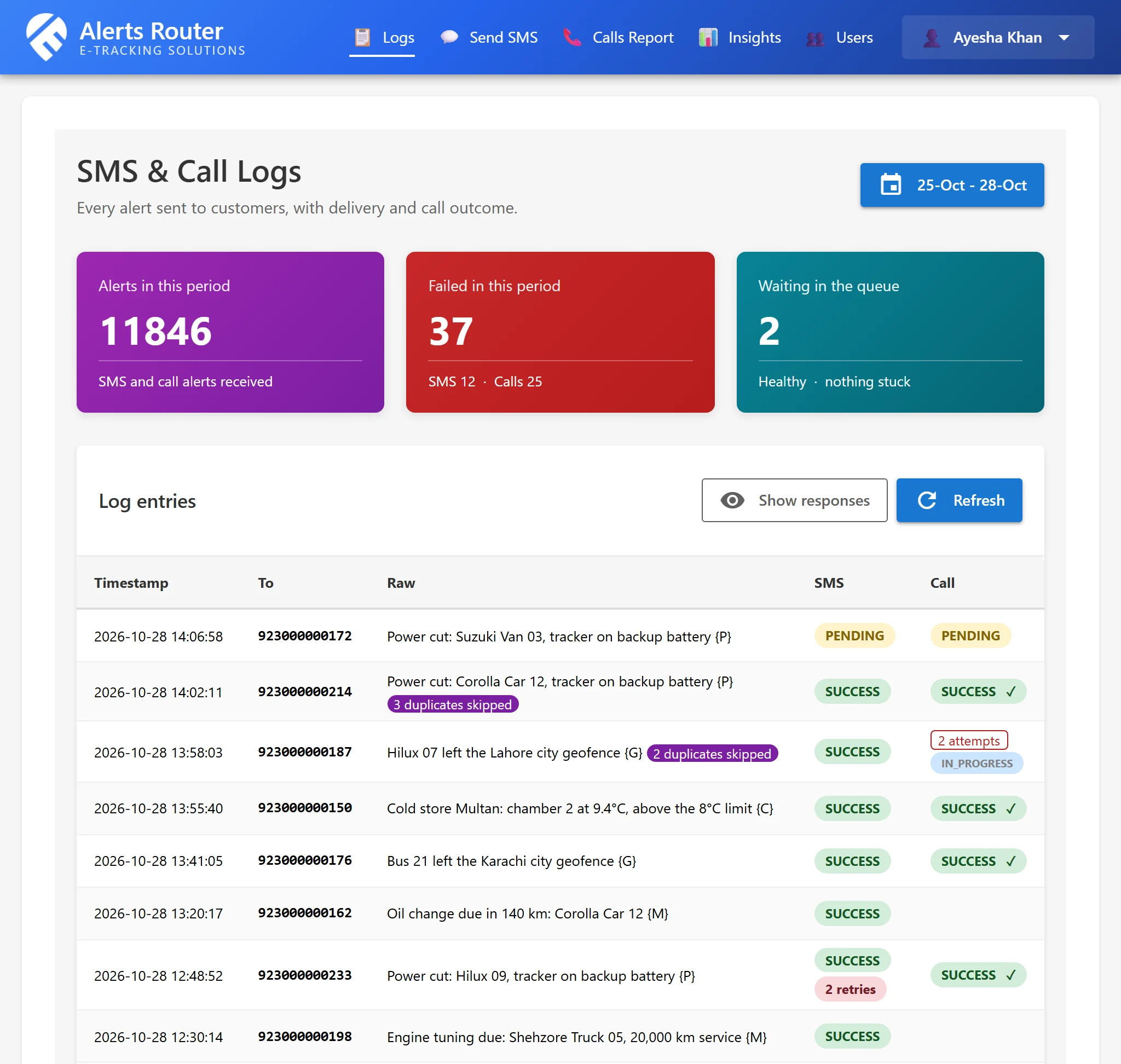
Every alert on record, from request to answered call

  • The Logs screen shows each alert with the status of its SMS and its call, and the gateway’s raw reply
  • Search by number or text, and filter by type and status
  • Repeats the router skipped are counted on the original entry
  • Anything that can make an HTTP request can send alerts: for example an ERP, accounting software, monitoring, CCTV and access control, logistics or fleet systems
Alerts Router Logs screen with sample alerts: vehicle power cuts, city geofence exits, oil-change and engine-tuning reminders and a cold store, each with its SMS and call status, duplicates skipped, SMS retries and a call still being dialled
Enlarge
The Logs screen in the portal, with sample data

Calls that are checked, not assumed

  • When the gateway accepts a call, the router later checks the gateway’s call report for the real outcome
  • No answer or busy: the call is dialled again, every few minutes, until the retry window you set ends
  • A pickup counts only if it lasts a minimum number of seconds
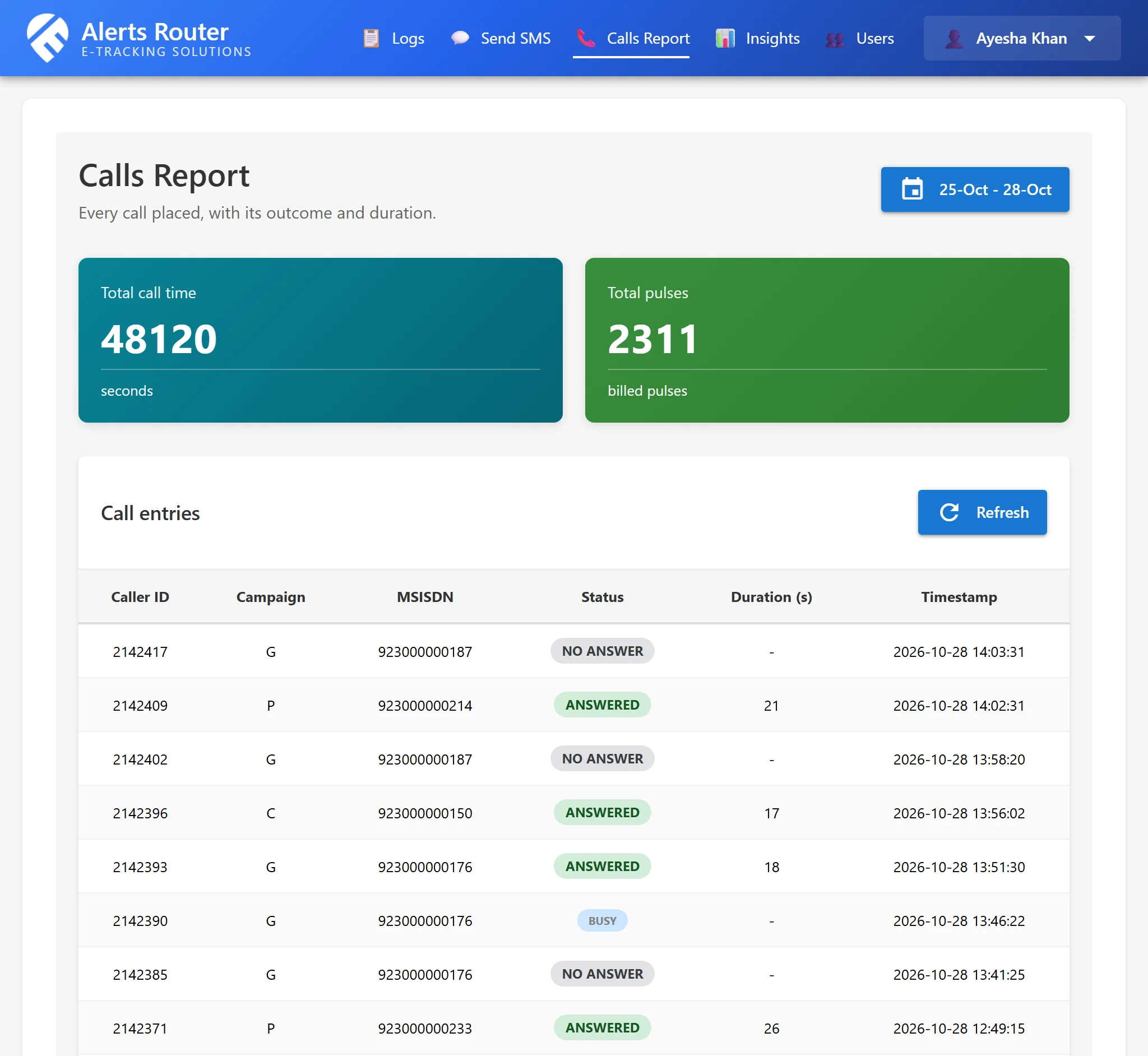
  • The Calls report lists every dial with its status and duration
Alerts Router Calls report with sample data: a city geofence exit alert for a bus dialled three times, no answer, then busy, then answered after 18 seconds
Enlarge
The Calls report in the portal, with sample data

Want alerts from software you can’t change?Tell us what sends them today and we will scope it with you — no obligation.

What the SMS and voice call alert router does today

Every feature below is built, deployed and running. Anything not built yet is listed separately as coming soon.

One HTTP call sends the alert
Your software POSTs to one URL. The router answers in plain text with what it scheduled for each number.
  • Five form fields: user, pass, phone, message and an optional delivery_mode
  • A plain-text answer per number, so your code can log what happened
  • Wrong credentials or fields come back as a 422, too many requests as a 429
  • Works with anything that can make an HTTP request: ERP, accounting, monitoring, CCTV, logistics, fleet
SMS only, call only, or both
Choose per request how the alert goes out. The default is an SMS and a phone call.
  • SMS & Call (default), SMS only, or Call only
  • The reply says which of the two was scheduled
  • A request whose mode does not fit the message answers "Nothing to send"
A tag picks the recorded voice message
Put a tag from {A} to {Z} in the message. It chooses which pre-recorded voice message is played on the call, and it is removed from the SMS text.
  • Up to 26 tags, each mapped to a voice message registered with the call gateway
  • The tag is stripped, so the SMS your customer reads is clean
  • A message with no tag is not sent at all (unless a keyword adds one, below)
Keywords add the tag for you
If your software cannot add a tag, the router adds one when the text contains a keyword from a list kept in its configuration.
  • Only applied when the message has no tag yet
  • The keyword list lives in the install's configuration and is set up for you
Duplicate alerts are suppressed
The same message to the same number inside a time window is skipped, so a noisy source does not flood a phone or burn credit.
  • Window is configurable (180 minutes by default)
  • Timestamps inside the text are ignored when comparing
  • Each suppressed repeat is recorded on the original log entry
  • The reply says "Ignoring because a same request was received recently"
Calls are verified and re-dialled
A call the gateway accepted is not assumed answered. The router checks the gateway's call report and dials again until someone picks up or the window ends.
  • The call report is checked every five minutes
  • Not answered or busy: dialled again, within a retry window you configure
  • A pickup counts only if it lasts at least a minimum number of seconds (3 by default)
  • Every dial and its outcome is kept on the alert's log entry
Ordered call escalation
Send several numbers in one request: the first gets the SMS and the first call, the others are dialled in order if nobody answers. The first pickup stops the rotation.
  • Everyone gets a first dial before anyone gets a second
  • Later numbers get calls only, never the SMS
  • The first answered call ends the rotation, so one alert is one connection
  • A cap on how many numbers one alert may dial is configurable

Good to know: Built and tested, but our own live alerts do not use it yet: our tracking software sends one number per alert.

Failed SMS are retried
An SMS the gateway rejected is sent again later instead of being lost.
  • Up to three attempts by default, spaced at least an hour apart (both configurable)
  • A retry is a re-send of a message the gateway rejected, not a duplicate
  • Can be switched off with one setting
A request cannot become a phone tree
The number of recipients in one request is capped, and bad entries are dropped instead of dialled.
  • Ten recipients per request by default; more is refused with a 422
  • Entries that are not usable phone numbers are skipped
  • A marker value can be sent to acknowledge an alert without sending anything
Rate limiting
The send endpoint limits requests per source address per minute, and admin logins are locked out after repeated attempts.
  • 20 send requests per minute per IP by default (configurable)
  • Five admin login attempts per minute per IP by default (configurable)
  • Going over a limit answers 429
Sandbox mode for safe testing
With one setting on, the router accepts requests and logs them exactly as usual, but sends no SMS and places no calls.
  • Connect and test your software before any real message goes out
  • Logs mark each entry as suppressed by sandbox mode
Admin portal: logs and call report
A web portal shows every alert and what happened to its SMS and its calls.
  • Logs: search by number or text, filter by type and status, with the gateway's raw reply
  • Calls report: caller ID, campaign, number, status, duration and time
  • Send a manual SMS from the portal
  • A user manual inside the portal
Insights: find what burns your SMS and call credit
A read-only analysis of your own logs that ranks the sources causing avoidable messages and calls, and says what looks wrong with each.
  • Top suspects ranked by avoidable usage, tagged for example "Duplicate leak" or "Area outage"
  • A savings simulator: fix the worst N and see the drop
  • Last 24 hours against your normal, and area-wide events told apart from one noisy source
  • Rankings, a per-day chart, a weekday-by-hour heatmap and CSV export
Email watchdog
The router emails your admins when usage looks abnormal, so you open Insights before the credit is gone.
  • Volume surge, SMS failure burst or a gateway fault such as low balance
  • A new or spiking noisy source, or an area-wide event
  • No alerts arriving for hours in the daytime, and a stuck send queue
  • Optional morning digest; each warning has a cooldown
Two-factor login and roles
Portal users can turn on authenticator-app login, and each user is given only the screens they need.
  • Time-based one-time codes (TOTP) for any authenticator app
  • Admin users, plus users limited to chosen screens: logs, calls, send SMS, insights
  • Admins can add, deactivate and reset users, including their password and 2FA
  • Sessions expire, with an optional idle timeout
A separate API key for each of your systems
Each system that sends alerts can have its own key and secret, with its own limits, so one can be changed or switched off without touching the others.
  • Secrets are shown once and stored only as a hash
  • Optional list of allowed IP addresses per key
  • Optional requests-per-minute limit per key
  • We create, change and switch keys on request
Encrypted off-server backups
Our own install is backed up every night to a private storage bucket, encrypted before it leaves the server.
  • Database, configuration and server settings, GnuPG-encrypted, 14 days kept
  • A heartbeat monitor emails if a night's backup is missed or fails
  • Admins can also download a zipped database backup from the portal

Coming soon Not built yet

These are planned, not available. We list them so you know what the router does not do yet; none of them is part of what you would be buying today.

  • Rules by tag, keyword, time and recipient. Decide per alert what happens: which channel, which gateway, how often to retry, how long to suppress repeats.
  • More than one gateway, with automatic fail-over. Move to the next gateway automatically when the first one fails.
  • Cost-based routing. Send each message through the cheapest suitable gateway.
  • Delivery status callbacks to your system. Your software is told when an alert was sent, answered or abandoned, instead of having to look in the portal.
  • White-label install under your own name and logo. The portal shows your company name, logo and colours, set up from a settings file rather than a rebuild.
  • Urdu and other Unicode SMS. Messages in Urdu and other scripts, once the gateway's Unicode handling has been verified.

Connect your software in one HTTP call

No SDK to install. If your software can POST a form, it can send an alert.

curl -X POST "https://alerts.example.com/api/send" \
  --data-urlencode "user=YOUR_API_USER" \
  --data-urlencode "pass=YOUR_API_PASSWORD" \
  --data-urlencode "phone=923000000101" \
  --data-urlencode "message=Cold room 2 above limit {C}" \
  --data-urlencode "delivery_mode=SMS & Call"

The host and credentials above are placeholders. Phone numbers use the 92… format, and every message needs a tag from {A} to {Z}, which picks the recorded voice message and is removed from the SMS text. delivery_mode is optional and can be SMS & Call (the default), SMS only or Call only.

What the router answers

  • 200Plain text, one line per number: “SMS and Call have been scheduled.”, “SMS has been scheduled and will be sent shortly.” or “Call Scheduled”
  • 200“Ignoring because a same request was received recently” when the alert was skipped as a duplicate or had no tag
  • 200An empty body when no usable number was left in the request

When something is wrong

  • 422Wrong user or pass, a missing or invalid field, or too many recipients. Note: bad credentials answer 422, not 401
  • 429Too many requests from one address (20 a minute by default)

Find what burns your SMS and call credit

Alerts cost money every time they send. Insights finds the sources that cost the most for the least value.
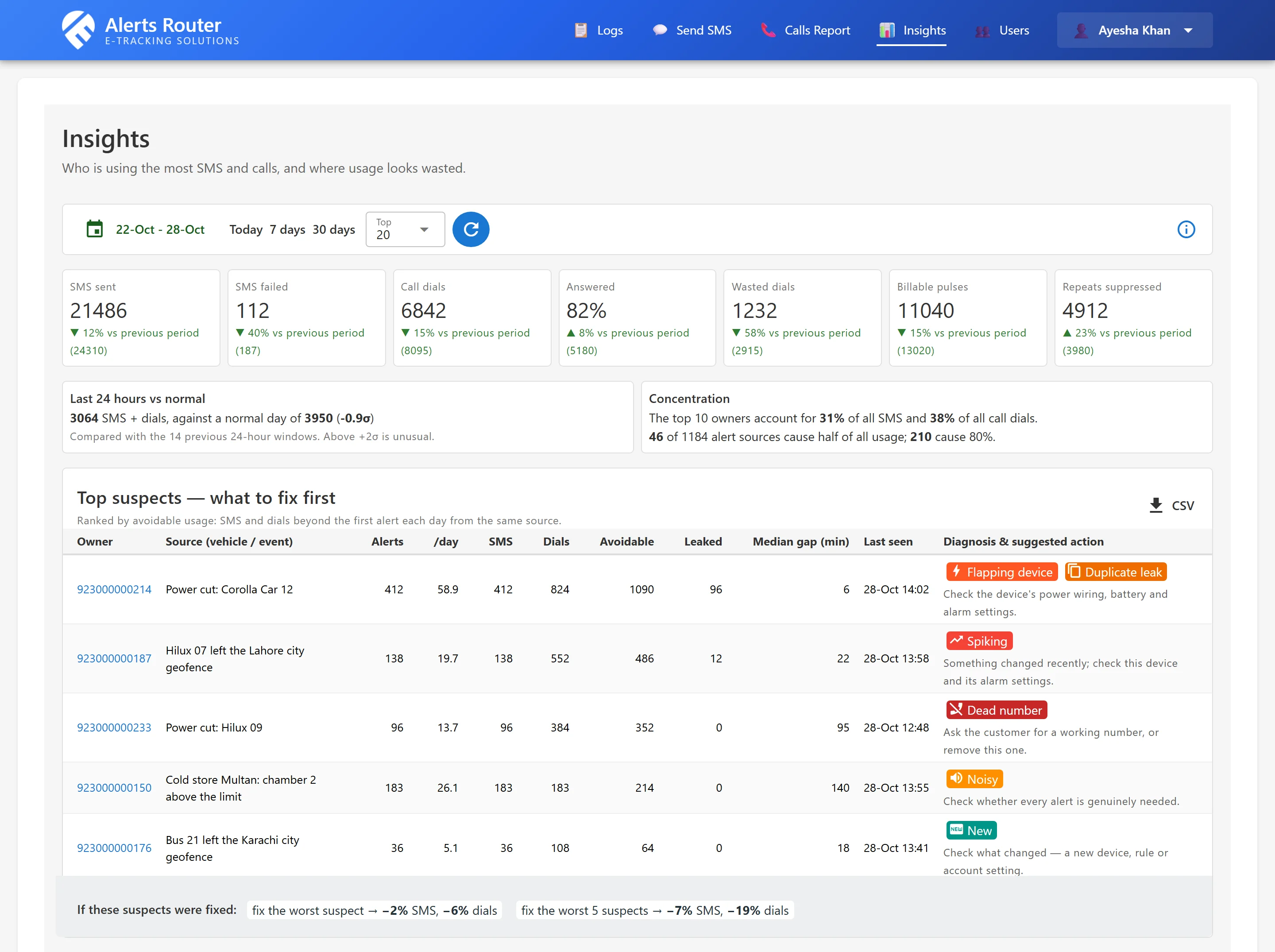
Insights: the numbers and sources behind avoidable usage

  • Top suspects, ranked by avoidable SMS and dials, each with a diagnosis such as a duplicate leak or an area-wide outage
  • A savings simulator: fix the worst few sources and see the drop
  • The last 24 hours against your normal, so a surge stands out
  • Rankings, a per-day chart and a weekday-by-hour heatmap, with CSV export
  • Long messages that cost extra SMS segments are flagged
Alerts Router Insights screen with sample data: a week of SMS and call usage against the week before, and the top suspects such as a vehicle whose tracker keeps reporting power cuts, ranked by avoidable SMS and dials, each with a diagnosis and a suggested fix
Enlarge
Insights in the portal, with sample data

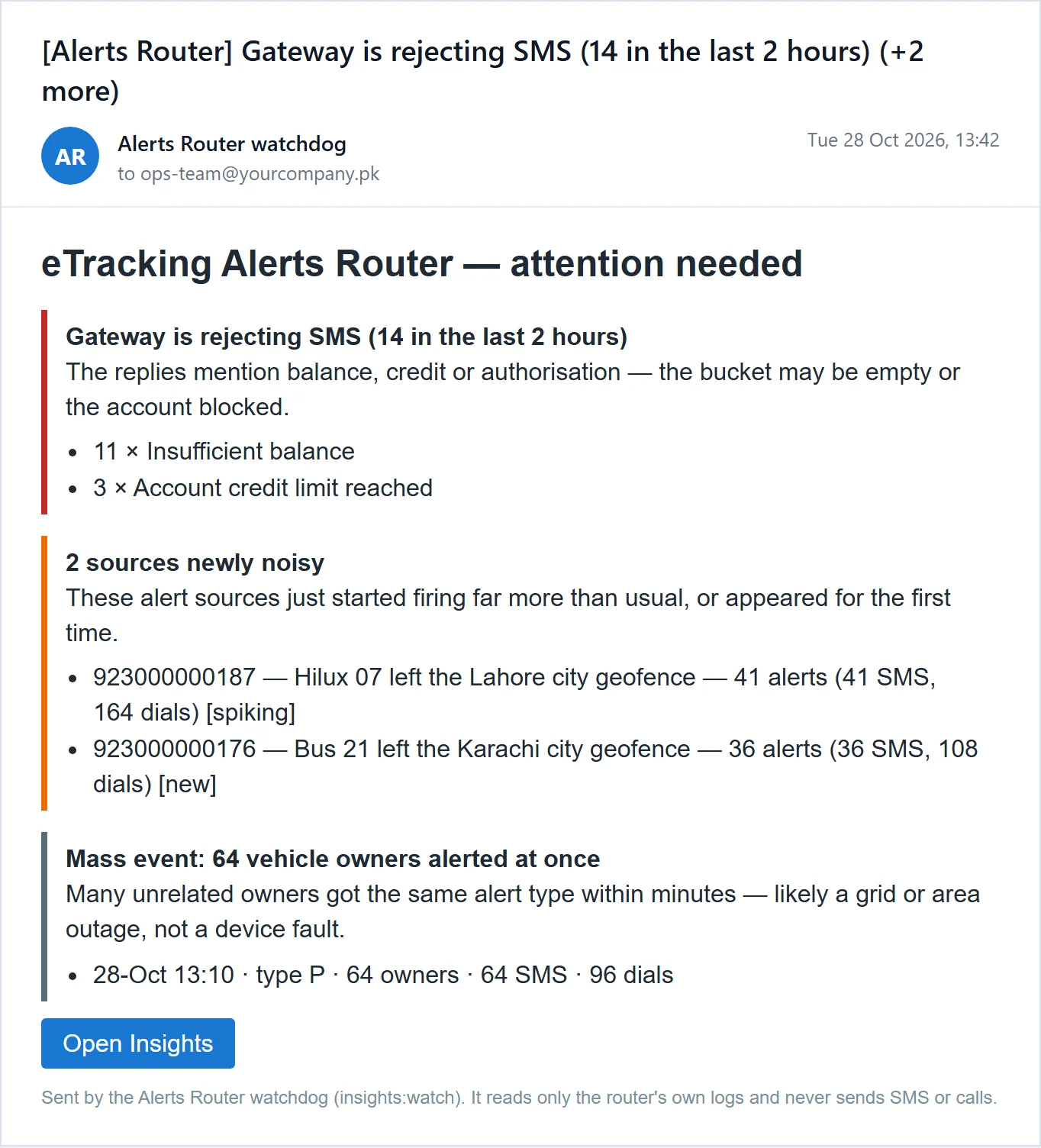
An email watchdog that warns you early

  • Warns your admins by email about a volume surge, a burst of rejected SMS, or a gateway fault such as a low balance
  • Spots a new or spiking source, and tells an area-wide event from one noisy source
  • Notices when no alerts have arrived for hours in the daytime, and when the send queue is stuck
  • An optional morning digest, and a cooldown so one problem does not become a flood of emails
A sample watchdog email from Alerts Router: the gateway is rejecting SMS for lack of balance, two vehicles are newly noisy, and 64 vehicle owners were alerted at once by an area power outage
Enlarge
A watchdog email, with sample data

Security and access you can check

Only what is in place today. Where something is still missing, we say so.
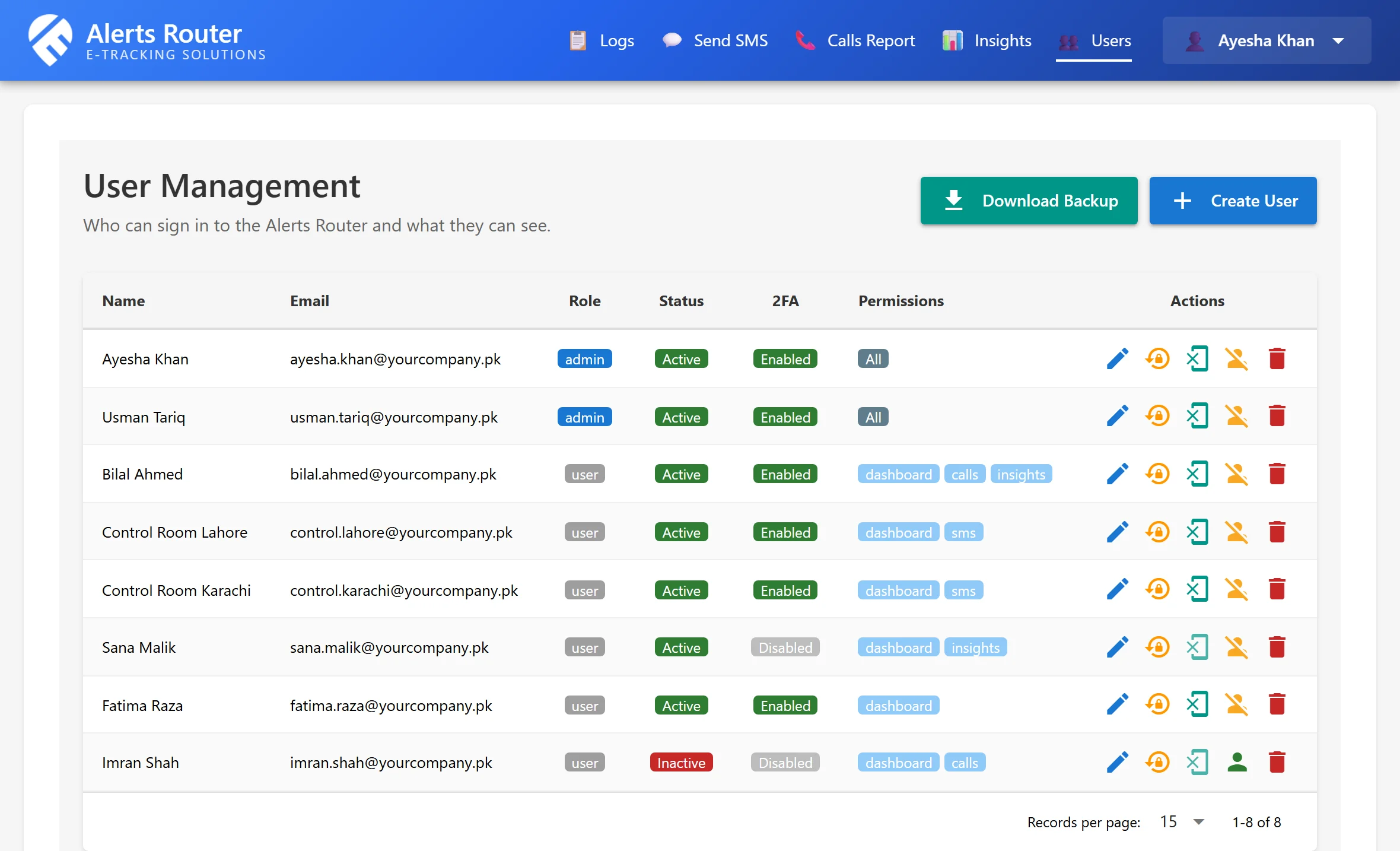
Who can do what

  • Two-factor login with any authenticator app, for every portal user
  • Admins, and users limited to the screens they need: logs, calls, send SMS, insights
  • Admins add and deactivate users, and reset a password or a user’s 2FA
  • Sessions expire, with an optional idle timeout
  • Login attempts and send requests are rate limited
  • Connections to the gateway are checked against its security certificate
Alerts Router User Management screen with sample users: role, active or inactive, two-factor login, and the screens each user may open
Enlarge
Users and roles in the portal, with sample data

Backed up and on record

  • Backups are encrypted before they leave the server
  • Nightly off-server copies, 14 days kept
  • A monitor emails if a night’s backup is missed
  • Every alert, SMS and call outcome is logged

To be clear about the limits: keys and limits are created by us on request, not from the portal, and alert delivery reports back to your software are planned (see Coming soon).

A hosted service, in three levels

Alerts Router is a subscription service that we host and look after. We quote for each organisation, because the scope depends on your alert volume and what you want connected.

Set-up

We set it up for you

Your own Alerts Router, ready for your software’s calls.

  • Your own separate database and portal logins
  • Voice message tags set up, and your portal users created
  • Connected to your own SMS and voice-call provider accounts
  • A walkthrough of the portal and the API
Request a Quote
Subscription

We run it for you

Everything in the set-up, and we host and look after the service.

  • Hosted and monitored by us, with encrypted nightly backups
  • Insights and the email watchdog switched on for you
  • We keep the software up to date and help when an alert does not arrive
  • Stays active for the length of your subscription
Request a Quote
Custom work

We connect your software

Everything in the hosted service, plus development work for your case.

  • Your software’s alert output connected to the router
  • Your own tags, messages and keyword list
  • Anything beyond SMS and voice is a custom project, quoted separately
Request a Quote

No prices on this page, on purpose. You bring your own SMS and voice-call accounts with your providers and pay the providers for them directly; the subscription covers only our software and service, agreed when we quote.

Hosting and ownership

Where it runs
On our servers, as a service. You do not install or maintain anything: you get a web address for your software to call and logins for your team.
Your data
Each customer has a separate database. Admins can download a database backup, and Insights tables export to CSV.
The software
We host, update and support it. You receive portal logins, not the source code.
Your provider accounts
You provide your own SMS account and voice-call account with your providers. Our software receives the request from your system and routes it to each of them.
One organisation per service
Each hosted service serves one organisation’s systems, each of which can have its own API key.

Route any APIs, not just SMS and voice

One incoming request, sent on to two or more of your systems, by rules you define.

Built on request by our development team. SMS and voice calls are what Alerts Router does today. Routing to any other API is a custom project: scoped to your business case, quoted, and built for you. It is not part of the standard service.

A new CRM lead

Push it to WhatsApp for the sales team and place a voice call to whoever is on duty.

A paid invoice

Record it in the ERP and send the customer an SMS in the same step.

An IoT alarm

Open a ticket in the ticketing system and call the engineer on call.

Request a Quote for custom routing

Not sure whether it fits your software?Tell us what raises the alert and who should be told — we will say plainly if it fits.

Frequently asked questions

Straight answers to what developers, IT managers and operations teams ask us most.

What is an SMS and voice call alert API router?
It is a ready-made service that sits between your software and an SMS and voice gateway. Your software sends one HTTP request; the router checks it, sends the SMS, places the phone call, re-dials if nobody answers, retries a failed SMS, skips duplicates and logs what happened. You do not have to build any of that into your software.
Is this a developer API platform, an auto-dialler or a bulk-SMS panel?
No. It is an alert and notification router for one organisation’s own systems: ERP and accounting software, monitoring, CCTV and access control, logistics, fleet and facilities. It is not an auto-dialler, not a marketing bulk-SMS panel and not a pay-per-message developer platform. It is a hosted service: we run it for you, so there is nothing for you to install.
How does my software send an alert?
With one HTTP POST to the router’s /api/send address, carrying five form fields: user, pass, phone, message and an optional delivery_mode (SMS & Call, SMS only or Call only). Anything that can make an HTTP request can do it: a script, an ERP, a monitoring tool. The reply is plain text that says what was scheduled for each number. The code samples above show curl, PHP and Python.
Which SMS and voice providers does it work with, and whose account is it?
The accounts are yours. You bring your own SMS account and your own voice-call account with your provider, and the router uses them to send. It connects to the API of your SMS service provider and of your voice-call service provider. We provide the software: it receives your system’s request and routes it to the SMS service and the call service. The provider is chosen when your copy of the service is set up, so you are not tied to one vendor. If your provider’s API is not connected yet, we add it during set-up, and we quote that work first.
What does the phone call say?
The call plays a pre-recorded voice message. You put a tag from {A} to {Z} in the message, and the tag chooses which recorded message is played. The tag is removed from the SMS, so your customer reads clean text. The call does not read your SMS aloud. Messages without a tag are not sent.
What happens if nobody answers the call?
The router checks the gateway’s call report every five minutes and dials again if the call was not answered, until someone picks up or the retry window you set is over. A pickup counts only if it lasts a minimum number of seconds. If you send several numbers in one request, they are dialled in order, and the first pickup stops the rotation.
What happens if the SMS fails?
When the gateway rejects an SMS, the router sends it again later. By default it makes up to three attempts at least an hour apart, and both numbers can be changed. It cannot fix a rejection that is permanent, for example a number that does not exist.
How does it stop the same alert flooding a phone?
The same message to the same number inside a time window (180 minutes by default) is skipped, and each skipped repeat is recorded on the first alert’s log entry. Timestamps inside the message are ignored when comparing. A repeat whose text also carries a changing value can slip past, which is exactly what the Insights screen reports as a duplicate leak.
How do I see what was sent and what is wasting credit?
The admin portal has a Logs screen with every alert and the status of its SMS and calls, and a Calls report. The Insights screen analyses your own logs and ranks the sources causing avoidable messages and calls, with a diagnosis for each and a savings simulator. An email watchdog warns your admins when usage looks abnormal.
Can I test it without sending real messages?
Yes. Sandbox mode is a single setting: the router accepts your requests and logs them as usual, but no SMS is sent and no call is placed. Switch it off when you are ready to go live.
How is access protected?
Portal users can turn on two-factor login with an authenticator app, and each user sees only the screens their role allows. Logins and sends are rate limited, sessions expire, and connections to the gateway are checked against its certificate. Backups are encrypted before they leave the server. Each of your systems can have its own API key, with an optional list of allowed IP addresses and its own send limit, so one system can be switched off without touching the others.
Where does it run, and who looks after it?
It runs on our servers as a hosted service, and we look after it. You get a web address for your software to call and portal logins for your team. Each customer has a separate database. You do not receive the source code. The SMS and voice-call accounts with your providers are yours, and they bill you for them directly.
Can it route to APIs other than SMS and voice?
Not out of the box. SMS and voice calls are what it does today. Routing one request to other systems, such as a CRM, an ERP, WhatsApp, email or a ticketing tool, is a custom project built to order by our development team and quoted for your case. See the custom routing section above.
How much does it cost?
It is a subscription service, and the price depends on your alert volume and on whether you want custom integration work, so we quote for each organisation. Send us a message on WhatsApp or request a quote and we will come back with a clear proposal.

Add alerts to your software

Tell us what sends the alerts today and who should get the SMS or the call. We will come back with a scope and a quote.

Request a quote

Call Now WhatsApp Get a Quote